deviant art

Deviant Login Shop  Join deviantART for FREE Take the Tour
[x]
Download Image
JPG, 600×2564
more ▶

More from *starca

Featured in Groups:

Details

February 11, 2012
170 KB
600×2564
Link
Thumb

Statistics

Comments: 10
Favourites: 31 [who?]

Views: 1,421 (0 today)
Downloads: 40 (0 today)
[x]
:iconstarca:
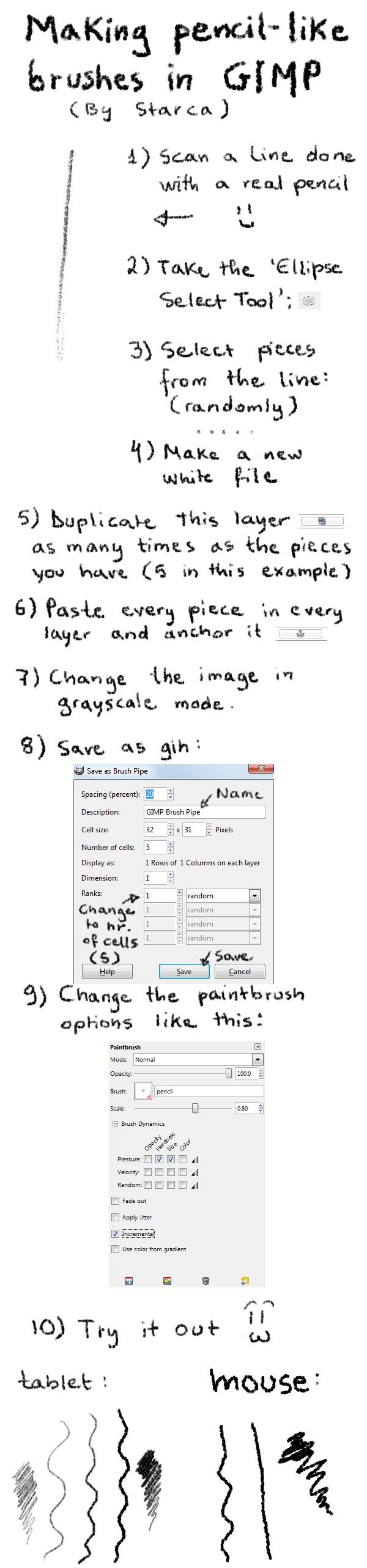
Small, quick tutorial about how to make your own pencil-like brushes for Gimp starca's way ^^> (I forgot to mention that by turning the image into grayscale before saving allows you to change the color of the brush the way you want afterwards.)

If you have any questions feel free to ask :)
Look for other tutorials here: [link]
Add a Comment:
 
:icontherealbeautifly:
I can't paste every dot into every layer! every duplicated layer is white, so any one's coming after the first won't show up ;__; help.
Reply
:iconstarca:
You paste the dot in one layer when you're ON that layer. So go on the first layer (click it in the layers dialog so it's selected) and paste the first dot (copy only that). Anchor it. Copy the second dot and then click on the second layer and and paste it. Anchor it. Do the same for the rest.
Reply
:iconflurrin:
~Flurrin Jan 4, 2013  Hobbyist Digital Artist
How do I get it in with the other Brushes?
Reply
:iconstarca:
If you have your brushes in another folder then: Go to Gimp menu Edit -> Preferences. In the end of the list at your left there's "Folders". Open it and go to "Brushes". Click the first icon in the right window to make a new brush folder. Then click the last icon to open your folder. Add a tick to it, click "OK" and restart Gimp.
Otherwise, find the original "Brush" folder of the Gimp in your PC and copy-paste your new brush. :)
Reply
:iconflurrin:
~Flurrin Jan 13, 2013  Hobbyist Digital Artist
Thank you!
Reply
:iconstarca:
no problem ^w^
Reply
:iconrocan64:
:iconrightthumbsupplz::iconawesomefaceplz:Great tutorial!
Reply
:iconhe4rty:
~he4rty Feb 11, 2012  Hobbyist General Artist
I was playing around with the idea of pencil brushes and a mouse, off the top of my head I'm sure I had a background colour of white set the paintbrush mode to multiply. this meant a light grey colour which got darker every time you coloured over it.
Reply
:iconstarca:
you can try various ways ^^ I just use this one lately. It works nice with a tablet, not too strong not too pale :)
Reply
Add a Comment: